How to Get Fox News on Roku: A Full Guide
If you’ve ever wondered how to get Fox News on Roku, this article will walk you through every option from installing the official app to streaming it via live‑TV services and help you troubleshoot common issues along the way.
Why It’s Not as Simple as Searching

Although Roku provides its users with the opportunity to access a broad range of apps, including news channels, to watch live Fox News one needs to do something more than simply install the software. Fox News itself does not support subscription packages through Roku, and one must use a cable operator account or supported live streaming service to watch live news. This is due to the existence of contractual licensing agreements, which restrict how Fox is able to offer its live programming.
Step 1: Installing the Fox News Channel App
The first step is straightforward. On your Roku device:
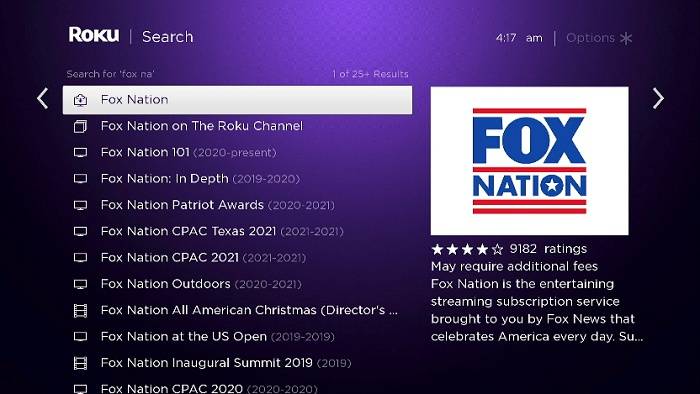
- Go to the Roku Home screen, then select Search.
- Type “Fox News”.
- Look for the official Fox News Channel entry and choose Add channel.
Once installed, open the channel. Also, note that an account that you have created via TV provider login will not allow you to stream live content.
Step 2: You log in with Your Provider Login
Opening the Fox News app without a provider login will prompt you to sign in. If you choose Sign In, you’ll be given an activation code and directed to visit foxnews.com/connect from a phone or computer. There, select your cable or live‑TV provider from the dropdown list and enter your login credentials that link your Roku device to your account.
If Fox News is part of your TV package but the provider is not listed, this is common Roku does not count itself as a provider. Rather, you should watch it on one of the larger services i.e. Hulu + Live TV, Sling TV, or DIRECTV Stream.
Step 3: Subscription Using Streaming Services
No cable subscription? No problem. You can access Fox News via several subscription-based live‑TV streaming services, all compatible with Roku devices:
- Sling TV Blue plan offers Fox News and comes in at around $40–$50 per month.
- Hulu + Live TV includes Fox News plus Hulu’s streaming library, Disney+, and ESPN+.
- DIRECTV Stream includes Fox News across all tiers and often features free trial options.
- fuboTV Pro also carries Fox News and is especially attractive for sports viewers.
After subscribing, download the respective service from the Roku app store and log in. Fox News will then be accessible through the provider link inside the Fox News app or via the provider’s menu.
Step 4: On‑Demand Access with Fox Nation
If live streaming isn’t essential, consider Fox Nation a standalone subscription that offers next‑day replays of major shows, documentaries, and exclusive content. While it does not provide live Fox News Channel programming, it fills in with a broad selection of on-demand content. You must download the Fox Nation app from the Roku store and activate it via your Fox Nation account.
Step 5: Free Alternatives for Partial Fox Content
In the event that you want to watch some Fox-oriented content without a subscription, Roku supplies some frugal picks there:
- News segments or headlines can be part of The Roku Channel content or of newly added FAST (Free Ad-Supported Television) feeds such as LiveNOW from Fox. Through them we get partial coverage of Fox media without complete programming.
- Note these are not live Fox News broadcasts, just curated snippets or affiliate content.
Common Installation & Streaming Issues
Many Roku users encounter technical glitches. Here’s how to resolve them:
- Missing Fox News Icon: If the app disappears from your list, restart the device or reinstall the Fox News channel via Settings → System → System Restart. Then re-add the app through the channel store.
- App shows No Internet Connection: Reddit users report needing to retry launching the app if it fails to connect initially. A restart or reinstall often resolves this.
- Free Preview Expired message: This means the app was accessible briefly without a sign-in but now requires a valid provider login to resume use.
Comparison of Watching Options
| Method | Live Fox News? | Cost / Requirement |
| Fox News App + Provider Login | Yes | Must have a provider (cable or streaming) |
| Live‑TV Streaming Service | Yes | Subscription (Hulu Live, Sling, etc.) |
| Fox Nation (on demand) | No | $5.99/month or annual plan |
| Free Roku FAST or The Roku Channel | Limited | Free, ad-supported, curated Fox content |
Troubleshooting Tips

Fox News may not show live video or apparently load:
- Check for app updates: Highlight the app, press * on Roku remote, then select Check for updates.
- Reboot the system: Settings → System → System Restart, or disconnect and let sit for 10sec.
- Make sure that your provider offers Fox News: This means that it does not matter whether your subscription is on time or not; there is the possibility that some packages do not offer Fox News.
- Provider not listed: You can still log in with most major cable or streaming TV providers without Roku being listed.
Why Roku Won’t Let You Subscribe Directly
Roku does not allow direct subscription purchases for Fox News due to third-party agreements. These agreements mandate that users obtain access through licensed TV providers or established streaming bundles. Reddit users confirm that Roku is never listed as a provider in the Fox News activation menu.
Additional Viewing Options on Roku
Users have other legitimate ways to access news content:
- News aggregator apps like Haystack News and NewsON stream local news and some national segments, but not full Fox News programming.
- Fast channels like those on The Roku Channel include headline coverage, but not live Fox News scripts.
These alternatives provide value for those seeking free news content, but if Fox News live shows are a requirement, you will still need the provider login route or a streaming TV service.
Final Thoughts
Put simply, the question of how to access the Fox News channel on Roku could be answered simply, by either downloading the Fox News channel app, then connecting up by using your cable or streaming TV service provider login details, or, they can just join one of the live TV streaming services instead. In case you are deprived of those, you may watch a small amount of programming on Fox Nation or free FAST channels, but you will not be able to enjoy live shows.
Be mindful of keeping your Roku up to date and reinstalling where needed and monitor providers and subscription prices. Broadcasting Fox News on Roku is associated with challenges in case of an adequate set up.